ip
Kraken User Guide
Kraken is a desktop chatbot for managing your tasks. It helps you track todos, deadlines, and events through a chat-style interface. Type your commands in the input box and press Enter (or click Send) to run them.
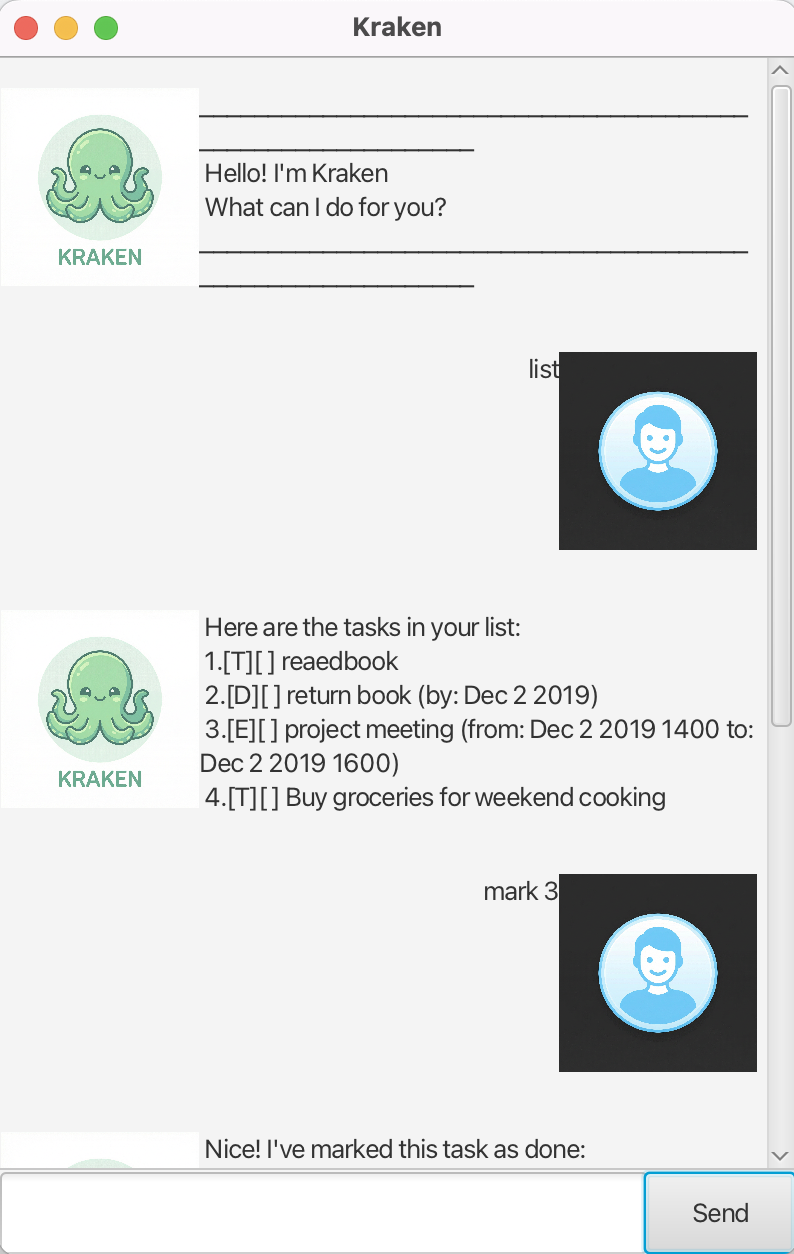
Quick start
- Ensure you have Java 17 or above installed.
- Download the latest
kraken.jarfrom the release page. - The Kraken GUI window will appear with a welcome message.
- Type your command in the input box and press Enter.
Example commands to try:
list: List all your tasks.todo Buy groceries: Add a simple todo.deadline Submit report /by 2025-02-25 1700: Add a deadline.bye: Exit the app.
Features
Notes about the command format
- Words in
UPPER_CASEare parameters you supply. e.g. intodo DESCRIPTION,DESCRIPTIONis the task text. - Items in square brackets are optional.
- Task numbers (index) in commands refer to the 1-based position shown when you run
list. - Some commands have short forms:
todo(t),list(l),find(f).
Adding a todo: todo, t
Adds a task without a date.
Format: todo DESCRIPTION
Example: todo Read project documentation
Expected outcome: Kraken confirms the task was added and shows how many tasks you now have.
Adding a deadline: deadline
Adds a task that must be done by a specific date/time.
Format: deadline DESCRIPTION /by DATE [TIME]
Supported date formats:
yyyy-MM-dd(e.g.,2025-02-25)d/M/yyyy(e.g.,25/2/2025)- Add
HHmmfor time in 24-hour format (e.g.,2025-02-25 1700or25/2/2025 1700)
Examples:
deadline Submit assignment /by 2025-02-28 2359deadline Pay bills /by 15/3/2025
Expected outcome: Kraken confirms the deadline was added.
Adding an event: event
Adds a task with a start and end time.
Format: event DESCRIPTION /from START_DATE_TIME /to END_DATE_TIME
Example: event Team meeting /from 2025-02-25 1400 /to 2025-02-25 1600
Expected outcome: Kraken confirms the event was added. The start time must be before the end time.
Listing all tasks: list, l
Shows all tasks and their status (done/not done).
Format: list
Expected outcome: A numbered list of all tasks, with [T] (todo), [D] (deadline), [E] (event), and [X] for done or [ ] for not done.
Finding tasks: find, f
Searches for tasks whose description contains the given keyword.
Format: find KEYWORD
Example: find meeting
Expected outcome: A list of tasks whose descriptions contain the keyword.
Viewing tasks on a date: on
Shows deadlines and events on a specific date. Accepts a date only (no time).
Format: on DATE
Example: on 2025-02-25 or on 25/2/2025
Expected outcome: A list of tasks that fall on that date (deadlines by that date, events spanning that date).
Marking a task as done: mark
Marks a task as completed.
Format: mark INDEX
Example: mark 2
Expected outcome: The task is marked as done and displayed with [X].
Unmarking a task: unmark
Marks a task as not done.
Format: unmark INDEX
Example: unmark 2
Expected outcome: The task is marked as not done and displayed with [ ].
Deleting a task: delete
Removes a task from the list.
Format: delete INDEX
Example: delete 3
Expected outcome: The task is removed and the task count is updated.
Exiting the program: bye
Closes the application.
Format: bye
Expected outcome: Kraken says goodbye and the window closes.
Saving data
Kraken saves your tasks to disk automatically. Data is stored in data/kraken.txt and is loaded when you start the app again.
Command summary
| Action | Format | Example |
|---|---|---|
| Add todo | todo DESCRIPTION |
todo Buy milk |
| Add deadline | deadline DESC /by DATE [TIME] |
deadline Submit report /by 2025-02-28 1700 |
| Add event | event DESC /from START /to END |
event Meeting /from 2025-02-25 1400 /to 2025-02-25 1600 |
| List tasks | list |
list |
| Find tasks | find KEYWORD |
find meeting |
| Tasks on date | on DATE |
on 2025-02-25 |
| Mark done | mark INDEX |
mark 1 |
| Unmark | unmark INDEX |
unmark 1 |
| Delete task | delete INDEX |
delete 2 |
| Exit | bye |
bye |